


CLM software features are the individual capabilities a contract lifecycle management platform offers, such as a searchable repository, OCR, renewal alerts, permissions, intake forms, approval routing, e-signature, reporting, and AI extraction. For a legal team deciding what to buy, the smart way to read them is as proof tests, not as a shopping list.
Think of it like a Friday afternoon. Finance asks when the Acme master agreement renews, whether auto-renewal already kicked in, and who signed the last amendment. In a healthy setup you type one search and read the answer in ten seconds. In a broken one you open four folders, check a shared drive and an old filing cabinet, ping two colleagues, and find the signed PDF in someone's inbox on Monday. That ten-second answer versus that three-day hunt is the whole reason CLM features exist, and it's the test every feature has to pass.
Every vendor demo turns every feature into a must-have. Intake forms, approval routing, AI risk flags, templates, dashboards: the rep clicks through all of it, and by the end your buying committee has quietly agreed that you need all of it. Then you sign, the rollout balloons, half the features never get switched on, and the contract you actually needed to find is still buried in someone's inbox.
So let's flip the question. The real job isn't "which features exist?" It's "which features does my team need in the first rollout, which ones can wait, and what proof should a vendor show before I count any of them as a reason to buy?"
This guide is built to help you make that call. We'll separate the features that earn their spot on day one from the ones that only matter if your team will genuinely use them, give you specific demo tests for each, and show how feature choices ripple into cost, adoption, and risk. By the end you'll have a scorecard you can take into a vendor room.
- CLM software features are best treated as proof tests, not a checklist of things every vendor claims to have.
- Name your buying sentence first: are you solving a findability problem or a process problem? That decides what goes in the first rollout.
- The repository and search layer is the floor. Test it on your messiest contracts, not the vendor's clean samples.
- Renewal alerts only count when a date becomes owned follow-up, not when a notification fires into a void.
- Don't overbuy workflow. Buy only the features someone can tie to a real use case this quarter.
- AI should keep a human in the loop, show its source text, and respect permissions.
- Map your must-have features to the lowest pricing tier that covers them, then step up later.
Choose Your Next Step
Your starting point depends on the pain. A findability problem points to the repository; a process problem points to workflow, but only after the team commits to using it.
You can't find signed agreements. The repository and search section below is your first rollout.
Contracts get stuck before signature. Read the workflow section, but confirm the team will use the workflow before you pay for it.
You're about to sit in vendor demos. Run every vendor through the same rows with the same contracts. A good CLM software checklist keeps that consistent. So does knowing which stage of the contract lifecycle each feature actually serves.
You want a neutral definition first. Thomson Reuters has a clear primer on what contract lifecycle management is.
1. What CLM Software Features Should Actually Help You Decide
Features describe what the software can do, but a feature you don't use isn't an asset. It's complexity you paid for. The job of a feature list is to help you decide what your team needs first, so read every line item against the work it removes, not the demo it photographs well in.
A contract lifecycle management (CLM) platform manages contracts from the moment someone requests one through drafting, review, signature, storage, and renewal. That's the textbook version, and Thomson Reuters covers the full lifecycle definition if you want the longer form. The buyer's version is shorter. It's the system that decides whether the next contract question gets easier or stays painful.
So the practical way to read any feature list is to ask three things about every line item:
What job does this feature do for my team specifically? Not for "legal teams" in the abstract. Yours.
What proof can the vendor show that it works on messy, real contracts? Not the clean sample file in the demo.
What does turning it on cost me in budget, rollout effort, and adoption? Every feature has a price beyond the line on the invoice.
If a feature can't answer all three, it doesn't belong in your first rollout. It might belong later. It might never belong. That's the same discipline behind a good CLM software checklist, which scores what a vendor proves in the demo instead of what the deck promises.
2. Start With First-Rollout Feature Fit
Before you grade a single feature, name what you're buying. Most teams fall into one of two buckets, and confusing them is how budgets get wrecked.
Some teams have a findability problem. The contracts are signed and scattered across folders, inboxes, a filing cabinet, and a few personal drives. Nobody can answer "when does the Acme MSA renew?" without a hunt. These teams need a searchable repository first.
Other teams have a process problem. Contracts get stuck before signature. Requests come in half-baked, approvals stall in email, and versions multiply. These teams need intake, review paths, and workflow.
Plenty of teams eventually want both. But "eventually" is the key word. If your pain is findability and a demo talks you into a full workflow rebuild, you have turned a quick first launch into a long one, and you go live later on the thing you actually needed.
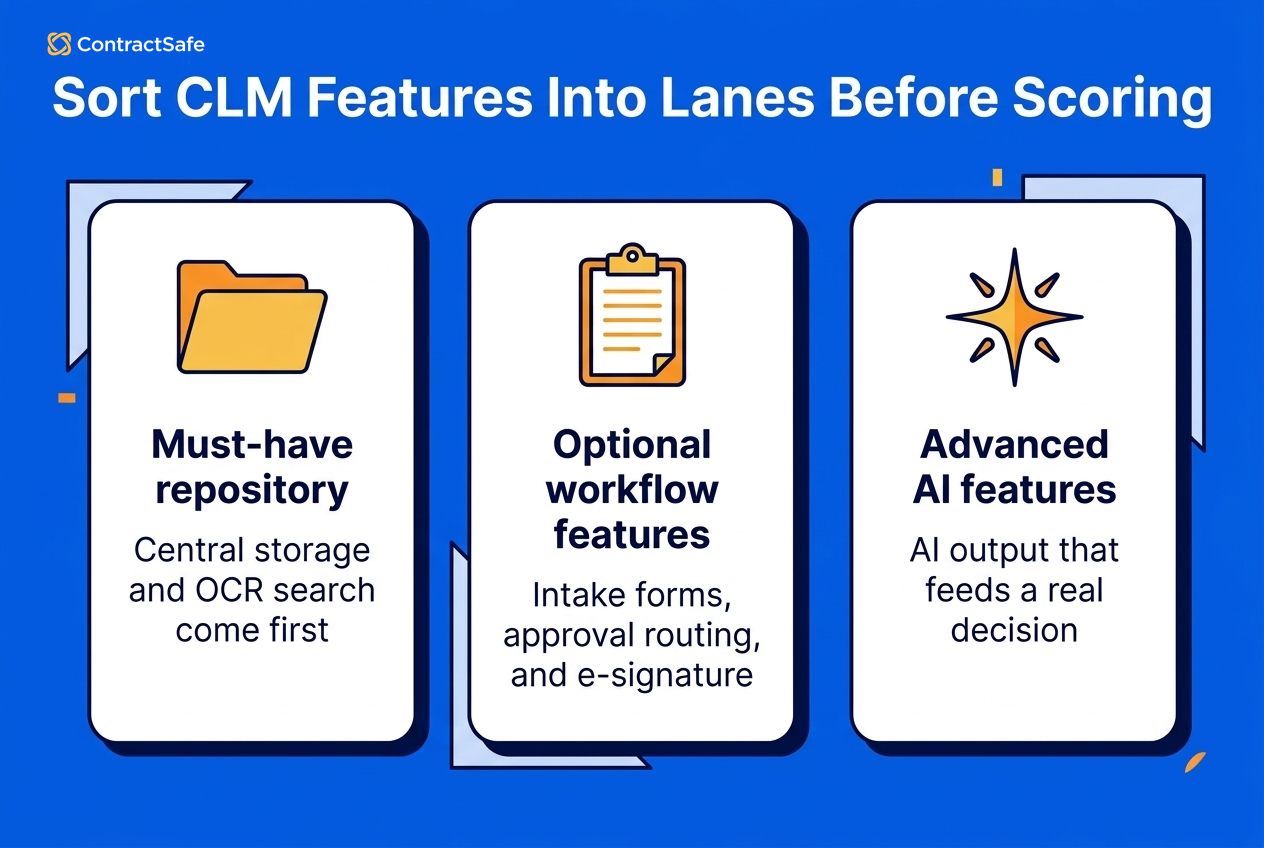
Here is a simple way to sort features into lanes before you score anything:
| Lane | Features in this lane | The question that decides it |
|---|---|---|
| Must-have repository | Central storage, full-text and OCR search, status tracking, attachments, version control, backups | Can your team find the right signed agreement when the file is messy? |
| Optional workflow | Intake forms, templates, approval routing, redlining, e-signature, system integrations | Will the team actually run contracts through these in the first rollout? |
| Advanced / AI | AI data extraction, contract chat, playbook-based AI review, lifecycle dashboards | Does the AI output get reviewed and feed a real decision, or is it a demo trick? |
Decision Check: Write your buying sentence at the top of your evaluation before the first demo: "We're buying a repository first," or "We're buying legal workflow," or "We're buying broader CLM and we will phase it." If your committee can't agree on that one sentence, you're not ready to score vendors yet. You're still arguing about what problem you're solving. The ACC offers a structured way to gauge where your function sits with its legal operations maturity model checklist.
3. Must-Have Repository and Search Features
The repository and search layer is the floor of any CLM tool. The must-have features are full-text and OCR search, filters, version control, linked amendments, audit trails, and self-serve backups. Test them on your messiest contracts, because if search fails there, nothing downstream matters and people fall back on filenames, folders, and memory.
Don't let the rep search a tidy file named `Acme_MSA_2025_signed.pdf`. Bring your own messy files to the demo:
A scanned third-party agreement (image-only PDF, no text layer)
A customer's paper on their template, not yours
An amendment that needs to connect to its original
One file with a genuinely bad name
Then ask the vendor to search inside those documents, filter by contract type and party, and pull up the current version. The passing answer isn't a slick search bar. It's the right agreement showing up when the file is a disaster. Write down the searches that fail, too. A missed scan or an orphaned amendment in the demo is a preview of the questions your team will still be answering by hand every week.
What "good" looks like in a repository:
Full-text search across PDFs and scans, so a clause buried in an image-only contract is still findable.
OCR that turns scanned documents into searchable text, because inherited paper is the norm, not the exception.
Filters for party, type, owner, date, and status.
A clear link between amendments, attachments, and the governing agreement, so the full story of a contract lives in one place.
Version control with an audit trail of who uploaded or changed what.
Your own downloadable backup, on demand.
This is the territory ContractSafe's repository is built for: central storage you can reach from anywhere, OCR that makes scanned PDFs keyword-searchable, status tracking you can customize to your process, attachments tied to the right contract, version control with a full audit trail, and backups you can download yourself anytime. If the main pain is finding signed agreements and the data attached to them, that's the feature set to put under a microscope.
The buyer move here: treat the repository as the practical foundation, and don't let a vendor wave past it to get to the flashier workflow demo.
4. Renewal, Deadline, and Owner Proof Tests
A missed renewal is the most expensive thing a contract system is supposed to prevent. So grade renewal features by the whole route, from contract language to a captured date to a reminder to the right owner to a decision someone actually makes. Don't grade them by whether alerts exist. Every vendor has alerts.
Buyers check the box because the feature exists. What you're actually scoring is the route, and whether a date ever turns into action.
In the demo, take one contract with a real notice window and ask the vendor to walk the whole path:
Can the notice date be captured from the contract record?
Can the alert go to both legal and the business owner, and to someone outside the company if needed?
Can ownership change without rebuilding the alert from scratch?
Can you set when the reminder fires, the way ContractSafe's alerts send them 30 days out, on a specific date, or on a recurring schedule?
Can a report or calendar show which deadlines still need attention?
A reminder with no owner is just noise. The test passes when the date becomes owned follow-up, not when a notification fires into a void.
ContractSafe's alerts are a useful reference for what to expect: customizable email reminders sent automatically (notify 30 days out, on a specific date, or on a recurring schedule), tracking for renewals, expirations, compliance, and payment dates, a calendar of upcoming dates you can sort by vendor, department, or manager, and the ability to send reminders to anyone on your team or outside it.
The reason email matters is simple. People live in their inbox. A reminder that only appears when you log into the software is a reminder you will miss.
One more question worth asking: what happens when the business owner changes roles? A good date model keeps the contract usable after that person leaves, because the date, the owner, the reminder, and the report all stay connected.
5. Access, Security, and Reporting Proof Questions
Access, security, and reporting decide who sees a contract, whether the data is safe, and whether the numbers hold up. Make the software prove all three live: set up real roles on screen, get security details in writing, and run a report on a messy record.
Access and permissions. Legal needs to share contract access without exposing sensitive agreements to the wrong people. So ask the vendor to set up real roles in front of you: a read-only auditor, a finance user who sees commercial terms, a procurement user, and a restricted folder only legal can open. The question isn't "do you have permissions?" It's "can I give the whole company useful access without leaking the deals that should stay private?"
Security. Don't accept "top-notch" or "enterprise-grade." Ask for the specifics and ask to see the documentation. What certifications are in place? Where does the data live? How is it encrypted? Is it backed up?
ContractSafe answers these on its legal contract management software page, listing SOC 2 (Type 2), ISO 27001, HIPAA, and GDPR compliance, and the pricing page goes deeper into the security stack, including 256-bit AES encryption, AWS infrastructure, offsite backups, and data residency options. Whatever vendor you're evaluating, get this in writing rather than in a sales sentence.
Reporting. A dashboard can look impressive while the data behind it's a mess. The fields are what make a report trustworthy: party, owner, renewal date, value, status, department, type. So run the field test:
Upload a messy contract, one with an amendment, an unclear owner, and a renewal date that depends on notice language.
Extract the fields.
Correct one field.
Run a report that depends on the corrected value.
If the report only works after the vendor cleans the record by hand, you have learned something important about your next twelve months. Ask who can edit fields, who approves corrections, and whether a corrected value updates the report immediately. Reporting you can't trace back to the contract is just a prettier spreadsheet.
6. Workflow Features Legal Shouldn't Overbuy
Workflow features in CLM software (intake, templates, approvals, redlining, e-signature, integrations) are genuinely useful but easy to overbuy, because they photograph well in a demo. Buy a workflow feature only when someone can name the specific contract use case it solves this quarter. Everything else waits.
"Sales needs to self-serve NDAs through intake" is a use case. "It would be nice to have approvals someday" isn't. If your real problem is finding signed agreements, paying for a full workflow engine you won't configure is buying a second project you didn't ask for.
Use this table to decide what goes live now and what waits:
| Workflow feature | Buy it now when... | Defer it when... |
|---|---|---|
| Intake forms | Requests arrive half-baked and legal is constantly chasing missing details | Contracts are already signed and you mostly need to organize them |
| Templates | Your team drafts the same agreements repeatedly and consistency is slipping | Most of your paper is third-party paper you don't author |
| Approval routing | Sign-offs stall in email and you can't see whose desk a contract is on | Your approval chain is one or two people who already coordinate fine |
| Redlining / Word editing | You negotiate heavily and need version history in one place | You rarely edit; you receive, sign, and store |
| E-signature | Signature is a bottleneck and you want execution tracked with the record | You already have a signing tool the team is happy with |
| Integrations (CRM, SSO, etc.) | A specific system must connect on day one to avoid manual data entry | The connection would be convenient but nobody is blocked without it |
ContractSafe's integrations are a good model for keeping this honest. The live page covers a two-way e-signature integration (signed agreements flow back automatically), Okta/SAML 2.0 single sign-on that works with Active Directory or any SAML 2.0 system, and a Salesforce integration that pushes contracts and key data from your CRM into the repository.
Notice the framing: connect the systems that remove manual work, not every system that could connect. Ask which integrations matter on day one and which are genuinely nice-to-have, then only score the ones tied to a real bottleneck.
7. AI Features That Keep Humans in the Loop
AI features in contract software should make a human faster and more confident, not replace the review. Judge any AI tool by three things: it shows its source text, it preserves human sign-off before reports or alerts rely on it, and it respects permissions so restricted users get no answers about documents they can't open.
A contract answer isn't a casual chatbot answer. If the AI tells finance a vendor renews next month, someone makes a budget call. If it tells legal an agreement has no assignment restriction, someone may approve a deal. If it lets a restricted user ask about a contract they can't open, your AI layer just became a permission leak. So the questions to ask are about what the AI is allowed to do:
What does it extract, and does it show the source text? You should be able to trace an extracted date or clause back to the language it came from.
Who reviews and approves the output before reports or alerts rely on it? AI suggests; a human should confirm.
Does it respect permissions? A restricted user should not get AI answers about documents they can't access.
Does turning AI on change the price or the plan tier? Get this in the quote, not after.
Is your data used to train someone's model? You want a clear no, and an opt-out.
ContractSafe's AI contract management page is a useful benchmark for the human-in-the-loop framing. The AI reads a contract and applies your playbooks to flag issues, you can ask plain-English questions and search by phrase ("contracts expiring in two weeks") instead of fiddling with filters, and you review, adjust, and accept the results so your data stays accurate.
On the privacy side: no using your data to train large language models, the ability to opt out of AI features entirely, no automated decision-making, and SOC 2 (Type 2), ISO 27001, and HIPAA compliance behind it, as listed on its legal contract management software page. ContractSafe includes AI data extraction and contract chat on every plan, while AI Contract Review is a Maximize feature. That plan split is worth confirming with any vendor before AI quietly becomes a separate line item.
The principle across every vendor: if a tool can't show its source or preserve your sign-off, keep it out of the decisions that matter.
8. Pricing, Rollout, and Adoption Impact
Feature choices cost money even when a feature is "included," because each one adds configuration, training, and ongoing upkeep. So price the rollout, not just the license: confirm what your specific tier includes, how users and contracts are counted, and what launch actually involves.
Three questions cut through most pricing fog:
Which features are in this quote, and which require a higher tier or an add-on? A demo often shows features from the top plan. Confirm what your plan actually includes.
How are users and contracts counted? Per-seat pricing punishes adoption. If every new viewer costs money, you will ration access and the system never becomes the source of truth. Volume-based pricing rewards getting everyone in.
What does launch actually involve? Is there an implementation fee? Do they help migrate your existing contracts? Is training included? Who owns the first report?
ContractSafe's pricing is a clean example of how this can work. Every plan includes unlimited users (no per-seat fees, so read-only auditors and the whole team can be in without budget anxiety), a free trial, onboarding and training support, data and document migration, unlimited archive and attachments, and a dedicated customer success manager, with pricing based on features and contract volume rather than headcount.
There's no implementation fee, and only contracts in your active repository count toward your total; drafts and attachments stored alongside them don't.
The plans tier sensibly. Organize covers the repository, search, alerts, AI data extraction and chat, custom fields, dashboards, and permissions. Finalize adds e-signature integration, SSO, redlining, approvals, e-signature, and Word editing. Maximize adds intake forms, templates, lifecycle tracking, AI contract review, and APIs.
That tiering is the whole point of first-rollout thinking. If you need a repository now, you buy the repository tier now. You don't pay for intake forms and templates you won't configure for a year. The buyer move: map your must-have features to the lowest tier that covers them, and only step up when a deferred workflow feature becomes a real use case.
Demo proof check: what to ask for in the room. Before the scorecard, make sure each vendor handed you these, not promises:
Search results pulled from your own scanned and badly named files, live.
One renewal reminder configured start to finish with a named owner and a lead time.
Roles set up on screen, including a restricted folder only legal can open.
Security certifications and encryption details in writing, not in a sentence.
A report that still works after you correct a field by hand.
A quote that names your tier, user counts, migration help, and any fees.
9. The CLM Feature Evaluation Scorecard
This scorecard turns a long vendor list into a short software shortlist. Score each contract platform as Proven, Unproven, or Failed, then compare them side by side. Anything Failed in a must-have area should block the purchase, not earn a "we'll fix it in onboarding."
Proven means the vendor showed it working on your real contracts. Unproven means they talked around it. Failed means the workflow broke when tested. Bring this into the vendor room and use the same contracts for every vendor.
| Feature area | Buyer job | Proof test | Red flag | Budget / adoption impact |
|---|---|---|---|---|
| Repository & search | Find the right signed agreement when the file is messy | Search inside a scan, a badly named PDF, and an amendment, live | Search only works on clean, well-named sample files | Weak search means people keep using folders and adoption stalls on day one |
| Renewals & deadlines | Turn dates into owned follow-up | Configure one renewal reminder with owner, lead time, and next action | Risk-reduction promises with no path from date to person | Missed windows cost real money; ownership gaps undo the whole feature |
| Access & permissions | Share access without exposing sensitive agreements | Set up read-only, finance, procurement, and restricted roles | Vague "granular permissions" with no live demo | Over-restrict and nobody uses it; under-restrict and you leak deals |
| Security | Protect contract data and pass audits | Ask for certifications, encryption, data residency, and backups in writing | "Enterprise-grade" with no documentation | A security gap can block the purchase outright |
| Reporting & fields | Trust the numbers you present to leadership | Correct a field, then run the report that depends on it | Reports need manual spreadsheet cleanup to be right | Untrustworthy reports mean someone keeps maintaining the spreadsheet |
| Workflow | Buy only the workflow the team will use now | Name the day-one use case for each workflow feature | Every workflow feature pitched as a must-have | Overbought workflow inflates cost and slows the rollout |
| AI with review | Get AI help without losing human judgment | Extract terms, show the source text, confirm the review step | AI answers with no source and no sign-off | Unreviewed AI fields create risk; surprise AI tiers inflate the quote |
| Pricing & rollout | Know year-one cost and launch work | Confirm tier, user counts, migration help, fees, and support | Year-one total cost is unknowable from the quote | Per-seat fees ration access; undefined launch work delays value |
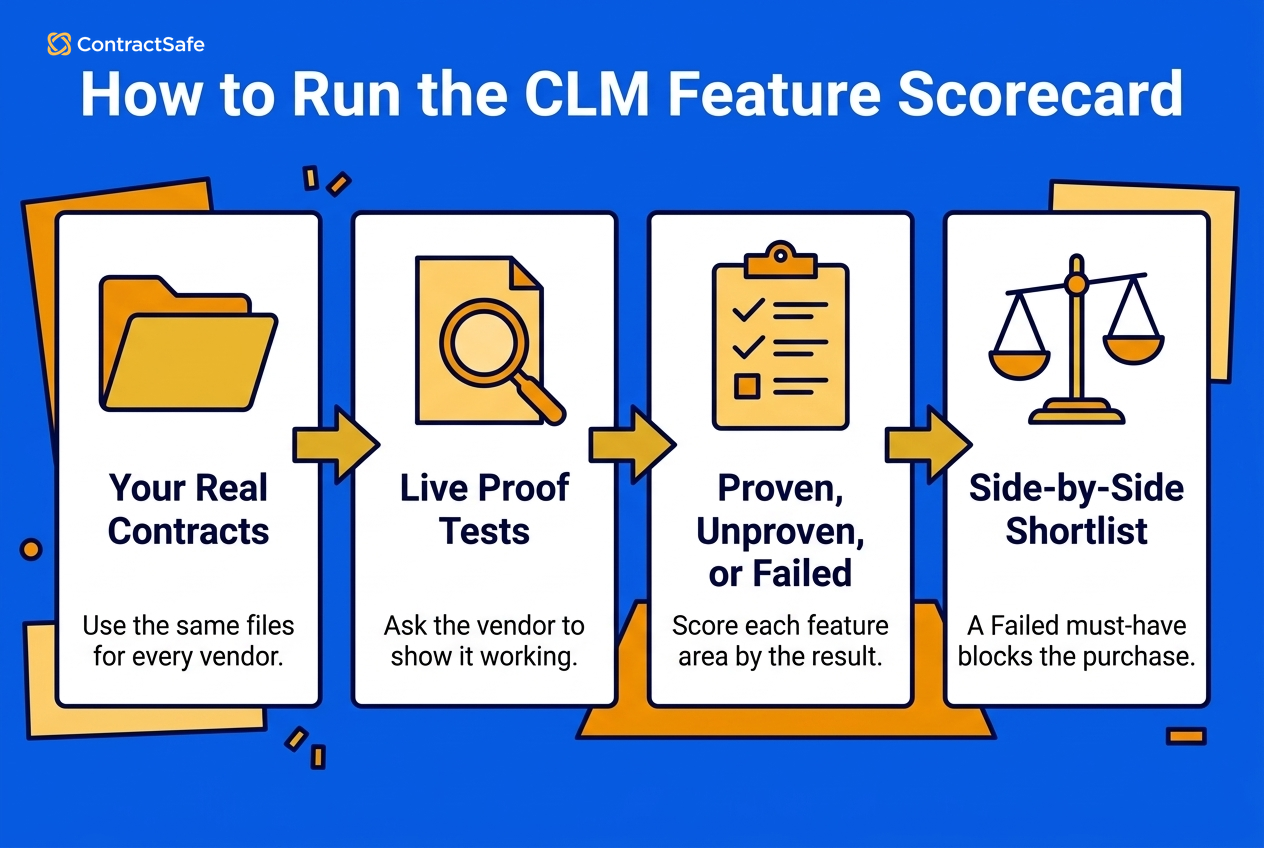
Run every shortlisted vendor through the same rows with the same contracts. A consistent scorecard is what keeps a great demo from beating a great fit, and it gives your buying committee a decision record instead of a vibe. If you want an outside reference point for how mature your contract function should be, the ACC publishes a contract management maturity model you can map against your scores.
Related Reading
CLM software checklist: Turn the feature areas above into a scored vendor test you run before, during, and after the demo.
AI contract software comparison: How to compare AI contract tools by workflow fit and evidence instead of feature volume.
Repository features: See the must-have repository, search, and OCR capabilities in detail.
ContractSafe pricing: Check what is included at each tier before you turn feature choices into budget assumptions.
How ContractSafe Helps With Full-Lifecycle CLM
ContractSafe is full-lifecycle contract management software for teams that need the whole organization to work from one system, from intake and drafting through signature and renewals, with capabilities varying by plan. Depending on the plan, that can include searchable agreements, dependable deadline alerts, sensible permissions, practical AI extraction, and useful reporting without turning the first project into a giant enterprise rollout.
Run it through the scorecard and the fit's concrete:
Repository and search: central storage, OCR that makes scans searchable, status tracking, attachments tied to their contracts, version control, full audit trail, and self-serve backups.
Renewals: customizable automated email reminders for renewals, expirations, compliance, and payment dates, routed to the people who need them.
Access and security: custom roles and permissions including read-only access, backed by SOC 2 (Type 2), ISO 27001, HIPAA, and GDPR compliance.
AI with review: plain-English search and answers, data extraction, and playbook-based AI Contract Review on Maximize, where you review and accept results, your data isn't used to train models, and AI data extraction and chat are included in every plan.
Workflow when you need it: e-signature, SSO, Salesforce, approvals, intake forms, and templates available on the right tiers, so you add them when there's a real use case instead of paying upfront.
Pricing and rollout: unlimited users on every plan, no implementation fee, included migration and onboarding, and a dedicated customer success manager, with pricing based on features and volume.
ContractSafe is built to handle both buying lanes: search and organization for teams with a findability problem, and intake, drafting, approvals, e-signature, and lifecycle tracking for teams managing the broader lifecycle. The fastest way to test it is to stop reading feature lists and start testing one. Bring the features your team thinks it needs and a few of your messiest contracts, then watch which requirements hold up when the file isn't perfect. Want to see what ContractSafe can do with your real contracts? Schedule a demo and run it through your own scorecard.






.svg)







.svg)




