


Quick answer: Contract lifecycle management best practices are the habits and settings that keep every agreement findable, owned and on schedule, from the first request through renewal. The three that matter most are centralizing every contract with required fields, setting alerts 90, 60 and 30 days before each notice deadline that go to a named owner, and routing approvals by written rules.
Here's why those three come first. Say you're the lucky person who gets to "get contracts under control." In practice, that means shared drives, outdated spreadsheets and email threads with an attachment called FINAL_v7_reallyfinal.docx. Then a vendor contract quietly renews for another year at a higher price. Somebody did set a reminder, but it was keyed to the expiration date, and the 60-day notice window had closed a month before it fired.
Misses like that add up. World Commerce & Contracting and Deloitte's study of 1,236 organizations, with data collected in 2021 and 2022, puts average contract value erosion at 8.6%, against a little over 3% for the best performers. The six habits below go after the everyday causes of that gap, like the missed notice window. They work best adopted in order, starting from a baseline, and once they're in place you can decide when to connect other systems and turn on AI.
Choose your next step:
If you're starting from scratch, begin with how to build a centralized contract repository.
If you're losing renewals to auto-renew, see how ContractSafe alerts handle notice deadlines.
If you're chasing approvals through email, look at contract approval workflows in ContractSafe.
Key Takeaways
- Set a baseline first: where contracts live, what's due soon, how long approvals take and which contracts have no owner.
- Centralization, the first of the contract management fundamentals, works when every record carries the same required fields and older contracts get migrated.
- Compliance needs alerts at 90, 60 and 30 days before the notice deadline, sent to a named owner, with escalation if nobody acts.
- Collaboration improves when approvals follow written rules and every stage has an owner.
- Templates backed by negotiation playbooks reduce risk and still leave room to negotiate.
- KPIs make contract management measurable once you compare them to your baseline.
- Connect your CRM and other systems, and turn on AI, after the data underneath is clean.
Contract Lifecycle Management Best Practices at a Glance
If you only do three things, centralize every contract with required fields, set renewal alerts at 90, 60 and 30 days before the notice deadline that go to a named owner, and route approvals by written rules. Everything else builds on those three. Here are all six contract management best practices in the order most teams should adopt them.
- Centralize all contracts in one location. Effort: moderate, mostly the migration. Payoff: every other practice depends on one place to look.
- Maintain compliance across the full lifecycle. Effort: low once dates are captured. Payoff: no auto-renewal you didn't choose.
- Enable cross-functional collaboration. Effort: moderate, since people have to agree on the rules. Payoff: approvals stop waiting in someone's inbox.
- Use standardized templates. Effort: moderate, since someone has to write down the fallback positions. Payoff: quicker drafting and fewer surprise clauses.
- Involve legal early and intentionally. Effort: low, mostly a written triage rule. Payoff: legal spends its time on the contracts that need it.
- Set and track KPIs. Effort: low once the baseline exists. Payoff: you can show the other five are working.
Connecting other business systems and turning on AI come after these six, once the data in your contracts is clean enough to trust. Before any of it, though, it helps to be clear on what contract management covers.
What Exactly Is Contract Management?
Contract management is the process of managing agreements from creation through execution, compliance and renewal. It includes intake, drafting, negotiation, approvals, signature, storage, obligation tracking and performance analysis.
Most contract activities fall into two lifecycle phases:
- Pre-signature: intake, drafting, negotiation and approvals before the contract is executed
- Post-signature: storage, compliance, obligations and renewals after signing
Each stage involves multiple people, revisions and deadlines. Without a clear process, important terms, obligations or renewal dates can easily be missed.
That's why process and data matter more than the contract management software you buy. In a typical large organization, contract data sits in 24 different systems, according to the WorldCC and Deloitte ROI of Contracting Excellence report. The same report found that 78% of organizations have made some investment in CLM over the last five years, yet average value erosion has improved only marginally, from 9.2% to 8.6%.
Here's what that gap is worth, as an illustration. At the 8.6% average erosion rate, a company with $10M in annual contract value loses about $860K a year. At the best-performer rate of roughly 3%, the loss is about $300K. The difference of roughly $560K is what these practices are competing for, and the first step toward it is knowing where you stand today.
Set a Contract Management Baseline Before You Start
Before you change any tools, write down where things stand today: how many contracts you have and where they live, how many renew soon, how long approvals take, and which contracts have no owner. Those numbers become the yardstick for every practice that follows.
A workable baseline covers four things:
- Where contracts live: count them by location, whether that's shared drives, email, the sales team's CRM or the filing cabinet nobody opens.
- What's coming up: list every contract that renews, expires or reaches its notice deadline in the coming quarter.
- How long approvals take: pick a few recent contracts of each common type and time them from request to signature.
- Who owns what: note how many contracts have no clear owner, or an owner who has left the company.
Then pick a few measurable goals of your own. Good ones sound like "no auto-renewal we didn't choose" or "NDAs signed within a week of the request." Write them down and give each one an owner, because a goal that lives in someone's head won't survive the first busy quarter.
Keep these numbers somewhere you'll find them again. They're the starting point for the KPIs in Best Practice #6, and the first number you'll want to change is how many places your contracts live.
Centralize All Contracts in One Location (Best Practice #1)
The first contract management best practice is the simplest to describe: put every agreement in one searchable place, with the same required fields on every record. While contracts live in several systems, they're effectively unmanaged, because no alert, report or search can see all of them at once.
A single, centralized contract repository gives everyone access to the same source of truth. This cuts time spent searching, ends version confusion, and lowers the risk of missed obligations or renewals across the contract lifecycle.
Centralizing contracts also supports oversight at every stage of the contract lifecycle, from creation through renewal, which is critical for effective contract lifecycle management. It only works if the repository is complete, though. A repository you only partly fill isn't a single source of truth, and the contract nobody uploaded tends to be the one that renews without warning.
A complete repository also improves accountability. When every contract is stored in one place, teams can quickly answer critical questions like:
- Who owns this contract?
- What are the key terms and obligations?
- When does it renew or expire?
Edward Soyka, Head of Legal and Compliance, Rugiet Health, describes the change: "Before ContractSafe, one person had a contract in Google Drive and someone else had it in SharePoint. Now I know where every contract lives, who owns it, and every date that matters."
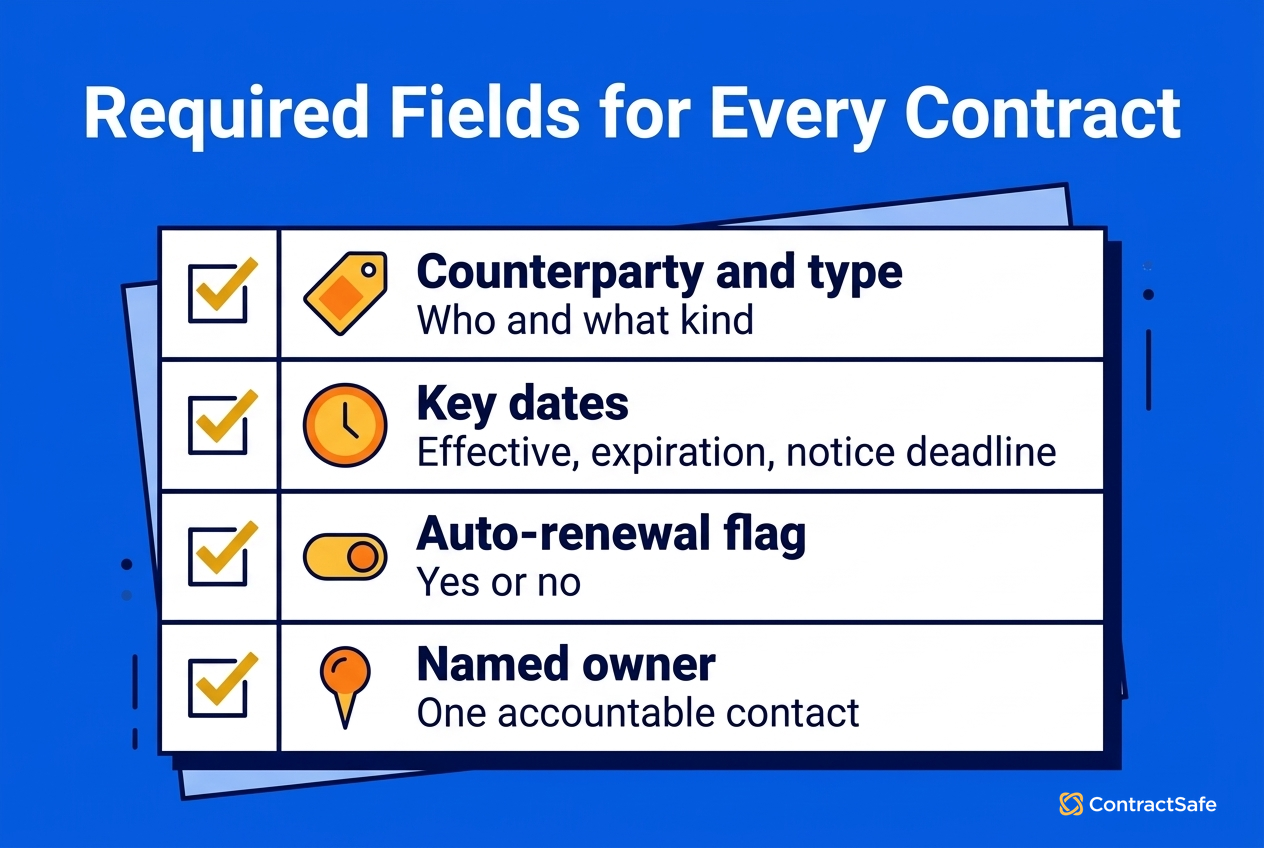
Decide What Every Contract Record Must Include
A repository only answers those questions about owners, terms and dates if every record captures the same fields. Make these required:
- Counterparty name
- Contract type
- Effective date and expiration date
- Notice period, plus the notice deadline it produces
- Auto-renewal (yes or no)
- Contract value
- Contract owner (one named person)
Pair the fields with a naming convention such as Counterparty_Type_Date (for example, Acme_MSA_2026-03-01) so a file still makes sense if someone downloads it.
Move Older Contracts in, in the Right Order
Required fields cover new contracts, but a repository that only holds contracts signed after go-live still leaves you hunting through old folders. Migrate active and auto-renewing contracts first, since they carry the deadlines that can cost you money. Use AI-assisted extraction to fill the required fields, then have a person spot-check the values. As you go, reassign any contract whose owner has left.
In ContractSafe, you can make fields mandatory for each contract type, and AI-extracted values can be accepted, corrected or skipped before they're added. Bulk uploads and data and document migration support are included on every plan.
Maintain Contract Compliance Across the Full Lifecycle (Best Practice #2)
Compliance is about keeping the promises in a contract after the ink dries, so renewals, price increases and audit rights don't catch you out. Once every contract has its dates captured, each obligation and deadline needs an owner and an alert that fires early enough to act on.
Many obligations (reporting requirements, audit rights, pricing changes, renewal terms) only apply post-signature. Without a way to track them, these obligations are easy to miss and hard to enforce. That's why contract lifecycle management keeps accountability in place for the whole life of the contract, not only up to signature.
Effective contract compliance requires:
- Clear tracking of obligations and deadlines
- Alerts tied to the right date, with one person responsible for acting on them
- Consistent review practices across contract types
Set Alerts That Someone Actually Acts On
The second item on that list is where most teams slip, because an alert nobody owns turns into background noise. Set up renewal alerts like this:
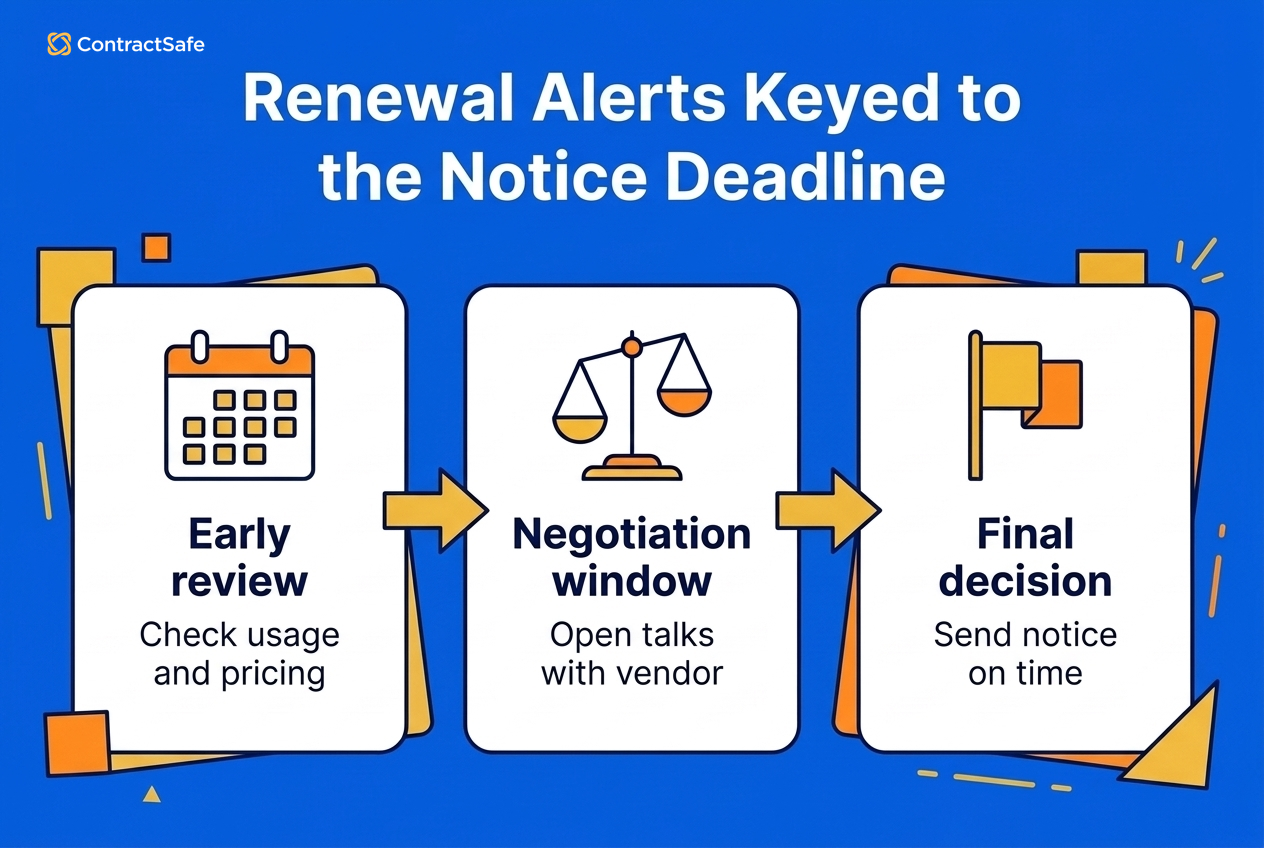
- Key alerts to the notice deadline. If a contract auto-renews unless you give 60 days' notice, the date that matters falls 60 days before expiration. Alerts keyed to the expiration date arrive after your chance to exit has passed. ContractSafe's deadline-to-nonrenew reminders exist for exactly this date.
- Use a 90, 60 and 30 day cadence. Ninety days gives you time to review usage and pricing, 60 to negotiate, and 30 to decide and send notice.
- Name one owner. Pick a person and skip the distribution lists.
- Escalate when nobody responds. Add the owner's manager to the 30-day alert. ContractSafe's custom notification settings send alerts with your own message to any email address, so the manager doesn't need a login.
- Log the outcome. Record each renewal as renewed, renegotiated or terminated, so next year's negotiation starts with real data.
Apply the same pattern to price increase dates, reporting deadlines, audit windows and insurance certificate renewals. For example, if a software vendor can raise its price on each contract anniversary, set the same three alerts ahead of the date the increase takes effect, so someone checks usage before the new rate lands.
ContractSafe alerts let you track a deadline-to-nonrenew date alongside unlimited other date fields and set recurring reminders. Each notification arrives with the contract attached, and bulk updating handles reassignment when an owner changes roles.
Carrie McClain, Procurement Specialist, Vitality Living, sums up the payoff: "ContractSafe helps us stay ahead of renewals and saves me at least a few hours every week. Instead of rebuilding information from SharePoint, I can pull the contract report I need and keep the process moving."
Why Contract Compliance Breaks Down
Without that kind of setup, compliance slips, and the cause usually sits in how contracts are stored and tracked:
- Contracts sit in static formats, like scanned PDFs nobody can search, so the obligations inside them stay invisible.
- There's no standard way to record obligations, so each team tracks them differently or not at all.
- Reminders live in one person's calendar, and they don't survive that person's vacation, let alone their departure.
Strong contract lifecycle management turns compliance into a routine with dates, owners and logged outcomes. Once that routine is in place, you're in a good position to decide how much software you actually need.
Do You Need a Contract Repository or a Full CLM?
If your main problems are finding contracts and catching renewals, a searchable repository with date alerts covers Practices #1 and #2. If approvals stall in email or you draft lots of similar contracts, you'll want contract management software that also handles approval routing and templates, and our guide to the best contract management software compares the options. Use your baseline to decide before you buy anything.
When you sit through a vendor demo, ask to see these three things working on one of your own contracts:
- An alert on a notice deadline going to someone without a login
- An approval reminder firing on a stalled contract
- AI-extracted values you can correct before they're saved
Whichever you choose, the next practices are about how people work together on a contract, and no tool settles that for you.
Enable Cross-Functional Collaboration on Contracts (Best Practice #3)
Collaboration is what gets a contract from request to signature without sitting in someone's inbox for a week, which makes it the contract management best practice that most affects how long deals take. Good collaboration means approvals follow written rules and every stage of the contract has a named owner.
Legal, Sales, Procurement, Finance, HR and Operations all touch contracts at different stages. Without shared access, collaboration turns into bottlenecks, duplicated effort and delayed approvals.
Effective contract collaboration means:
- Everyone works from the same version of the contract
- Changes and comments are visible in context
- Reviews happen in parallel instead of getting buried in email threads
Route Approvals by Written Rules
Parallel reviews only help if everyone knows whose review a contract needs. Decide who signs off on what before anyone hits send, and write it down:
- Value thresholds. A department head approves anything under a set amount, and finance joins above it.
- Nonstandard terms go to legal. Any change to indemnity, liability caps or governing law triggers legal review.
- Start with NDAs. They're high volume and low risk, so they're a safe place to prove the routing works.
- An exception path. Decide who can approve an urgent deal that doesn't fit the rules, and log each exception.
- Reminders for stalled approvals. A request that sits untouched should nudge the approver automatically.
For example, a vendor MSA where the other side wants to cap its liability at the fees paid goes to legal under the second rule, while an NDA on your own template can clear with the department head alone.
The rules matter because approvals are a common place for contracts to stall. In the Commerce & Contract Management Institute's US Government Benchmark Report 2026, internal review and approval processes were the leading cause of contract delay, cited by 62% of respondents. That sample is US government contracting, so read it as context for where delays come from, not as a benchmark for your company.
ContractSafe's approval sequences (Finalize and Maximize plans) put the routing rules and the stalled-approval reminder into practice. You set who reviews a contract and in what order. Pending approvers get an email reminder every three days, and a rejection stops the process, notifies the requester and keeps the comments so the contract can go back through.
Assign an Owner to Every Stage
Routing decides who approves; ownership decides who answers for the contract the rest of the time. Every contract needs one accountable owner, plus a clear answer to who drafts it, who approves it, who signs it and who monitors it after signature. When someone leaves, reassign their contracts during offboarding instead of discovering the gap at renewal time.
Shared access also takes pressure off the one person who knows where everything is. Rebecca Dockum, Trade Contract Manager, remembers showing her colleagues: "People’s minds were blown the first time I showed them they could search every contract at once. That moment alone has saved me from being the answer key every time someone has a question about an agreement."
Then train people. Walk the team through the templates and the intake form once, and point them to the written rules afterward.
The goal is clear handoffs, defined roles and fewer surprises late in the contract process. Templates are what make those handoffs quick.
Use Standardized Templates for Consistency and Speed (Best Practice #4)
Templates let people draft routine contracts without starting from a blank page or re-arguing the same clauses every time, as long as each template comes with rules for what people can change.
Templates help keep common terms (legal language, regulatory requirements, company information) consistent across contracts. That cuts drafting time and lowers the chance of errors.
When to Standardize, and When Not To
Templates work best for:
- Common contract types
- Repeated clauses and language
- Approved fallback positions
They should still allow flexibility for:
- High-risk or nonstandard agreements
- Heavily negotiated commercial terms
Standardization should speed contract work up. A template that forces every deal into the same shape just gets ignored.
Add a Playbook for Each Template
That flexibility needs limits, and a playbook sets them. A template tells people what the contract says. A playbook tells them what they can agree to when the other side pushes back. For each clause people actually negotiate, record three positions:
- Opening position: your standard language.
- Fallback: the change you'll accept without escalating.
- Walk-away point: the line that sends the contract to legal.
Review the playbook once a year. If one fallback gets used on most deals, your opening position probably needs updating. The walk-away points also feed the legal triage rules in Best Practice #5, so business teams know what they can agree to without legal.
ContractSafe's AI contract review playbooks (Maximize plan) check incoming contracts against your own rules, report passes and failures, and link to the relevant clauses. Any rule the AI drafts needs a person to review and accept it. Maximize teams can also build contract templates with locked wording and required fields.
Involve Legal Early and Intentionally (Best Practice #5)
Bringing legal in early means your lawyers spend their time on the contracts that need a lawyer, and it comes down to two habits: write down which contracts go to legal and which don't, and capture the context legal needs at intake.
Legal teams do their best work when they're brought in on purpose and early, instead of at the last minute to fix avoidable issues. Three pieces make that work in practice:
- An intake form that captures the counterparty, value, deadline and any change from the template before anyone asks legal for a review.
- A habit of flagging the specific issue when a contract goes to legal, so the reviewer knows where to look.
- A written rule for which contracts need legal review and which don't.
A simple triage table makes that last rule concrete, using the value thresholds from your approval rules and the walk-away points from your playbooks:
| Send to legal | Handle without legal |
|---|---|
| Contracts above your value threshold | NDAs signed on your template |
| Nonstandard indemnity or liability terms | Renewals with no change in terms |
| Anything past a playbook walk-away point | Changes within an approved fallback |
Clear handoffs help legal give faster, more useful guidance. On ContractSafe's Maximize plan, custom intake forms let anyone start a contract request with the fields legal needs. With routing, templates and triage written down, the last practice is checking whether all of it is working.
Set and Track Contract Management KPIs (Best Practice #6)
Track four outcome KPIs, compare each one to the baseline you set before you started, and review them every quarter so you can see whether the other five practices are working.
Tracking a focused set of KPIs helps teams spot delays, risk and wasted effort across the contract lifecycle. Measuring contract performance also shows the ROI of contract management in terms finance will recognize.
Track Four KPIs, Starting with a Baseline
- Request-to-signature cycle time, by contract type. NDAs and master agreements shouldn't share one average. WorldCC's August 2025 whitepaper says the best performers run contract cycles almost 4 times faster than the worst. It doesn't disclose a sample, so treat that as a rough outside reference, not a target.
- On-time renewal decisions. The share of renewals decided before the notice deadline, plus the count of contracts reaching a notice deadline in the next 90 days. ContractSafe's upcoming date calendar shows that second number at a glance.
- Share of contracts signed on your templates. A falling number usually means a template or playbook needs work.
- Legal escalations and contracts without an owner. Both should trend down as the rules from Practices #3 and #5 take hold.
Review all four each quarter against your baseline. ContractSafe's cycle time reporting and lifecycle dashboard (Maximize plan) show how long each contract has spent in each stage, and automated email reports can send the upcoming renewals list to anyone on a schedule.
For example, if your baseline showed NDAs waiting on legal well past your turnaround goal, cycle time by contract type tells you each quarter whether the NDA routing from the collaboration practice is closing that gap, or whether NDAs are still landing in legal's queue.
The point of KPIs is to make contract management improvements visible and actionable, so drop any metric nobody would act on. Here's a quick test: if you can't pull these four numbers in a few minutes, that's your first process gap. Once you can, it's worth getting that same data into the other systems your company runs on.
Connect Contract Data to Your CRM and Other Business Systems
Contract data only pays off when it reaches the systems where deals get closed and payments get made, so connect your CRM first, then e-signature, then single sign-on. Each connection removes a manual handoff where dates and versions tend to go missing.
Most teams still move contract data between systems by hand. Someone retypes a renewal date from a PDF into the CRM, or emails finance a spreadsheet of upcoming price increases. Multiply that across departments and you get the 24 different systems the WorldCC and Deloitte report found holding contract data in a typical large organization.
If you're starting from zero, here's the order that tends to pay off, and why:
- CRM first. When a deal closes, the signed contract lands in the repository with its dates and value, instead of waiting for someone in sales to forward it.
- E-signature next. The final signed version files itself, so nobody pulls up an earlier draft at renewal time.
- Single sign-on third. Access ends when someone leaves, through the same offboarding step where you reassign their contracts in Best Practice #3.
ERP and billing systems are the next layer. Many teams start there with scheduled exports and reports, such as a monthly list of upcoming price increases sent to finance, before building anything custom. Whatever you connect, set your required fields first, because a sync copies messy data just as faithfully as clean data.
Common Contract Management Mistakes (and How to Avoid Them)
Syncing messy data is one way to get the order wrong, and it isn't the only one. Most contract management mistakes come from skipping a step in the order above, like storing contracts without tracking them or buying software before the data is clean.
Mistake: Treating contract management as a filing problem.
Fix: Focus on the whole lifecycle, from intake through renewal.
Mistake: Overengineering workflows too early.
Fix: Start simple and standardize gradually.
Mistake: Involving legal too late.
Fix: Define intake and review criteria upfront.
Mistake: Keying renewal alerts to the expiration date.
Fix: Key them to the notice deadline, with ContractSafe reminders set at 90, 60 and 30 days ahead of it.
Mistake: Letting contracts go ownerless when someone leaves.
Fix: Make contract reassignment part of offboarding.
Mistake: Buying a CLM tool before cleaning up the data.
Fix: Set required fields and migrate active contracts first. A tool doesn't produce clean data by itself. It holds whatever you put into it, gaps and duplicates included.
That last mistake matters even more once AI enters the picture.
Get Your Contract Data Ready for AI
AI extraction and contract Q&A work well when your data is consistent: the same clause labels, clean counterparty records, and obligations stored as structured fields instead of buried in PDFs. Get that right, then let AI do the typing while a person checks the results.
Most teams aren't there yet. World Commerce & Contracting's AI in Contracting 2026 study of more than 500 practitioners found that only one in four use AI through their CLM, while 47% use AI tools daily. In other words, people are already using AI faster than their contract data can support it.
Even with clean data, the person checking the results still matters, and independent testing shows why. In the Vals Legal AI Report from February 2025, the top tool scored 75.1% on data extraction against a lawyer baseline of 71.1%, and tools often stopped after finding one relevant clause when several applied. Drafting looks similar. In LegalBenchmarks.ai's September 2025 drafting study, the best tool produced reliable first drafts 73.3% of the time, so roughly one draft in four still needed fixing. That's useful, and still short of something you'd sign without reading.
ContractSafe builds its AI around the same rule: AI suggests, and the human decides. Extracted values wait for someone to accept, correct or skip them, AI search only returns contracts the user has permission to see, and customers can use some AI features or none.
How Long a Rollout Takes
Since AI comes last, the question most teams ask next is how long it takes to get there. There's no honest single number, because it depends on your volume and how clean your records are, and no independent study we trust measures it. What you can control is the order, with a checkpoint before each next phase:
- Baseline, centralization and renewal alerts for one contract type. These pay off even with imperfect data. Move on once every active contract of that type has its required fields and an owner.
- Approval rules and templates. Move on once cycle time for that type has improved against your baseline.
- Playbooks, integrations and AI review, once clause labels are consistent. Move on once your four KPIs hold steady for a full quarter.
Then start again with the next contract type.
Where to Start With Contract Management Best Practices
So if you're starting this week, start with the baseline, then centralize and set the alerts, then add the rest one contract type at a time. Effective contract management comes down to consistency, clear ownership and doing the six practices in a sensible order.
The same order is what keeps things working as volume grows, so it's worth reading up on scaling contract management before your contract count doubles. If you're putting these practices into ContractSafe, see what to expect from a ContractSafe implementation.
Related Reading
These three guides go deeper on the repository, the CLM process and checking whether yours is working.
How ContractSafe Helps You Put These Best Practices to Work
ContractSafe gives you one place to run all six practices, and what you get depends on the plan.
Every plan includes required fields for each contract type, OCR so even scanned contracts are keyword searchable, and deadline-to-nonrenew reminders that can go to any email address with the contract attached. Every plan also includes bulk upload, data and document migration, and onboarding and training support, with no implementation fee.
The Finalize and Maximize plans add approval sequences, with an email reminder to pending approvers every three days, and unlimited built-in e-signatures that file the signed copy in place of the draft. They also connect to your own DocuSign account if you prefer it, and support Okta/SAML 2.0 single sign-on.
Maximize adds the rest of the full-lifecycle CLM toolkit: AI contract review against your own playbooks, contract templates, custom intake forms, the lifecycle dashboard, cycle-time reporting and the Salesforce integration.
ContractSafe pricing starts at $450/month (Organize plan, billed annually; $540 month-to-month), with unlimited users on every plan.
Shayne Hussain, Sr. Operations Manager at Covalent, explains why a shared drive stopped being enough: "OneDrive gave us a place to store agreements, but it was not a contract management system. As our volume grew, we needed a better way to track dates, tag agreements, route signatures, and find documents quickly."








.svg)







.svg)




