Searching for a specific contract shouldn't feel like a scavenger hunt. Our global search, located at the top of your dashboard or contracts list is designed to be powerful and straightforward, looking through every document and data point in your account.
Search for an exact word or phrase
To search for an exact phrase, place quotation marks around the words in the search bar. Quotation marks tell ContractSafe to look for the words together in the same sequence.
By default, the search bar looks for the words you enter in any order. If you need to find a specific phrase, just wrap it in quotations. This tells the system to only pull up documents that contain that exact sequence of words.

Narrow results with Advanced Search
Use Advanced Search when you need more control over where or how ContractSafe searches. Depending on the search criteria available to your account, you can narrow results by specific fields, combinations of words, dates, or other contract information.
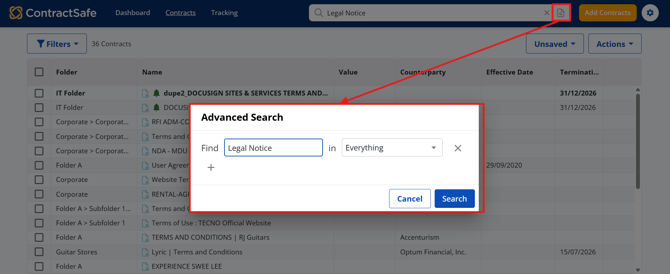
Click the Advanced Search button next to the X button, as shown in the image.
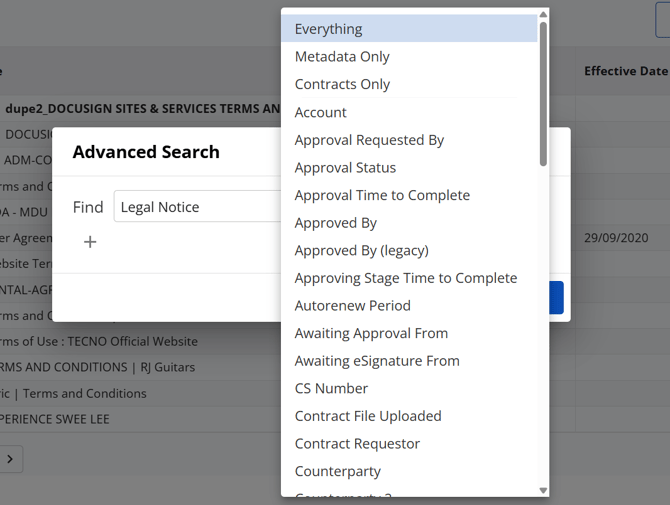
Enter the words you want to search for in the Find box, then select where you want the AI to search for those words, such as Everything, a specific folder, or another location.